Register at Jazzy Spins Casino and Get a No-Deposit Bonus Straight Away

Creating an account at Jazzy Spins Casino takes under five minutes. The process runs on the ProgressPlay platform, covers UKGC identity checks automatically, and unlocks your welcome bonus the moment your first deposit clears. This guide walks through every step: what data you need, where to find the registration button, how KYC works, and what to do if something goes wrong.

110% up to £50 + 50 free spins
Sign Upwith bonus
Why an Account Unlocks the Full Jazzy Spins Experience

Without a registered account you can browse the lobby but cannot spin for real money, claim bonuses or access the Jazz Club loyalty programme. Registration is the gateway to all four thousand-plus games, the 110% welcome match up to £50, fifty free spins on The Paying Piano Club, and the no-deposit £5 games bonus that arrives before your first deposit. Every feature - cashier, live chat, responsible gaming tools and the full Rewards Store - becomes available only once your account is active and verified.

Who Can Register at Jazzy Spins

Jazzy Spins holds a UK Gambling Commission remote licence (058267-R-334552-004) and accepts players exclusively from Great Britain. Before you fill in a single field, confirm three things:

Requirement Detail
Minimum age 18 years old
Residency United Kingdom only
Currency GBP (British pounds)
One account per person Duplicate accounts are prohibited

UKGC rules require an automated age check at sign-up. If the automatic check cannot confirm your identity, the account is frozen until you upload supporting documents. Having your passport or driving licence ready speeds things up considerably.

Jazzy Spins performs automatic age and identity verification during registration. For most UK players this completes instantly through existing credit reference data, so no documents are needed upfront.

Finding the Registration Button

On desktop, the 'Register' or 'Join' button sits in the top-right corner of every page. On mobile, the same button appears in the main navigation menu or at the top of the screen. There is no separate app to download - Jazzy Spins runs entirely in your iOS or Android browser, and the registration flow looks identical across all devices.

Go to Registration

How to Register: The Five-Step Form

Jazzy Spins splits the sign-up form into five short screens. Here is exactly what each one asks for:

  1. Personal details - full legal name and date of birth.
  2. Address - full UK address including postcode; select GBP as your currency.
  3. Contact info - email address and mobile number.
  4. Account credentials - choose a username and a strong password; enter your profession.
  5. Card verification - add a debit card to activate the no-deposit £5 games bonus.

The entire form collects: first name, last name, date of birth, email, phone number, nationality, profession and full postal address. This level of detail is not bureaucracy for its own sake - it satisfies UKGC responsible gaming requirements and speeds up future KYC verification.

Registration Form in Action

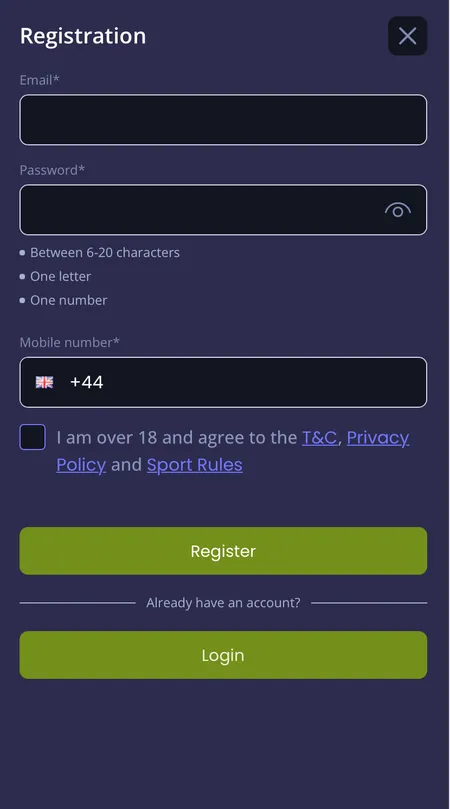
  1. Jazzy Spins account registration form on screen

    Open the registration page and fill in your personal details across the five steps: name and date of birth first, then address and currency, then contact information, then username and password, and finally debit card verification to unlock the no-deposit bonus.

Account Confirmation and First Login

After you submit the form, Jazzy Spins sends a confirmation email to the address you registered. Click the link inside to activate the account. If the email does not arrive within a few minutes, check your spam folder or contact support at [email protected].

Once confirmed, log in with your username and password. The platform does not offer social login (Google, Apple ID) - email and password are the only route in. Your personal cabinet opens immediately and shows your balance, active bonuses, Jazz Club status and transaction history.

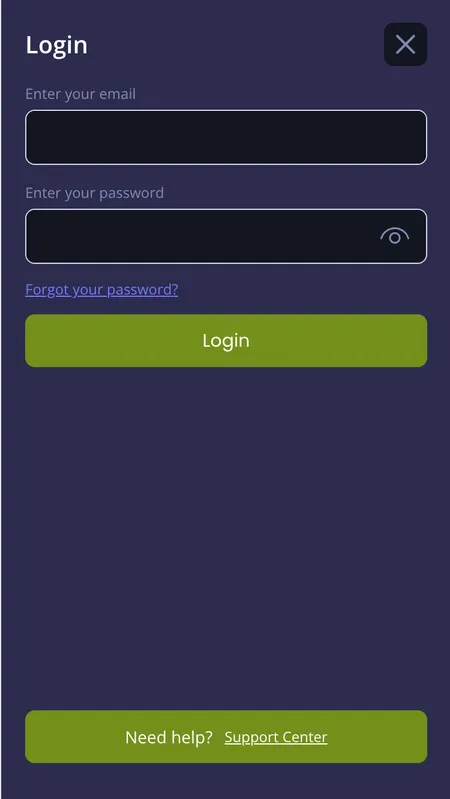
Jazzy Spins login screen after registration

The login form you use after confirming your account. Enter the username and password you chose during registration.

Password Rules and Account Security

Jazzy Spins requires a password that is sufficiently long and unique. Avoid reusing passwords from other sites. After registration you can enable additional security layers inside your account settings:

  • Strong unique password (mix of letters, numbers and symbols recommended)
  • Device verification checks for unrecognised logins
  • Optional multi-factor authentication (MFA)
  • Email and SMS notifications for account activity

These controls sit under your profile in the personal cabinet. Setting them up at registration rather than later protects your balance from the first session.

Jazzy Spins does not accept credit cards for deposits - this is a UKGC requirement. Use a debit card (Visa or Mastercard), PayPal, Apple Pay or bank transfer instead. Skrill and Neteller may be unavailable for UK accounts.

Your account is the key to 4,000 games, live casino tables and a welcome bonus worth up to £50 plus 50 free spins. Registration takes less than five minutes.

Registering on Mobile and Different Devices

No native app exists for App Store or Google Play, but the mobile browser version is a full replica of the desktop site. Android and iOS users access the same five-step registration form, the same cashier and the same Jazz Club rewards. You can add jazzyspins.com to your home screen for one-tap access.

The platform adapts automatically to screen size, so the form is just as usable on a phone as on a desktop browser. All fields, dropdowns and the card verification step work identically across devices.

For a detailed look at the Jazzy Spins app experience on mobile, including home screen shortcuts and browser tips, check the dedicated application page.

KYC Verification After Registration

Jazzy Spins requires identity verification before processing your first withdrawal. You do not need to upload documents immediately at sign-up, but completing KYC early avoids delays when you want to cash out.

Document type Accepted examples
Proof of identity Passport, driving licence, national ID card
Proof of address Utility bill or bank statement (max 3 months old)
Payment method Screenshot of e-wallet or photo of depositing card

Verification normally completes within 24 to 72 hours. Because ProgressPlay runs a shared verification system across its network (Mr Mobi, HippoZino, Vegas Paradise and others), if you have already verified at a sister brand the process here may be faster - though you still need a new account.

Registration and Your Welcome Bonus

Two bonuses activate through registration:

  • No-deposit bonus - £5 games credit, triggered by adding a debit card at step five of the form (wagering 40x, maximum withdrawal £100 plus the initial bonus amount).
  • First-deposit match - 110% up to £50 plus 50 free spins on The Paying Piano Club, activated automatically when you deposit at least £10. Bonus is valid for 30 days; free spins expire after 7 days. From 19 January 2026, UK wagering requirements are capped at 10x by UKGC rules.

Deposits via Skrill and Neteller do not qualify for either bonus. Use Visa, PayPal or Apple Pay to ensure the offers activate correctly.

You can claim a welcome bonus at up to five ProgressPlay network brands in total. After that limit, new bonus offers are no longer available across the network.

For full terms and current promo codes, visit the Jazzy Spins bonuses page.

Three Irish Treasures slot included in the Jazzy Spins welcome offer

Three Irish Treasures is among the slots commonly used for welcome free spins after a new account is verified at Jazzy Spins.

Common Registration Problems and Fixes

Problem Likely cause Solution
Confirmation email not arriving Spam filter or typo in email field Check spam; contact support if still missing after 10 min
Age verification failed Thin credit file or mismatched data Upload passport or driving licence
Phone number already in use Duplicate account exists Contact support - one account per person is the rule
Card not accepted at step 5 Credit card used instead of debit Switch to a debit card, PayPal or Apple Pay
Form submission error Browser cache or unstable connection Clear cache or switch to a different browser

If you hit a problem that is not listed here, the fastest resolution comes through live chat. Give the support agent your registered name, date of birth and a description of the error message. The free UK phone line (0800 018 3307) is available from 10:00 to 02:00 daily.

Start Registration Now

Registration FAQ

Can I register at Jazzy Spins if I live outside the UK?

No. Jazzy Spins holds a UKGC licence and accepts players from Great Britain only. Non-UK residents cannot create an account.

What is the minimum age to register?

You must be at least 18 years old. The platform runs an automatic age check at sign-up and may freeze accounts where verification cannot be completed instantly.

Do I need to verify my identity before making a deposit?

No, but KYC verification is required before your first withdrawal. Completing it early avoids delays when you want to cash out.

Why does Jazzy Spins ask for my profession?

Profession is one of the data points collected to satisfy UKGC responsible gaming and anti-money-laundering requirements. It is standard across ProgressPlay network brands.

Is there a mobile app for registration?

There is no dedicated iOS or Android app. Registration and all other functions work through the mobile browser on any smartphone or tablet.

How do I get the no-deposit £5 bonus?

The £5 games bonus is triggered by verifying a debit card at step five of the registration form. No deposit is needed, but wagering is 40x with a maximum withdrawal of £100 plus the bonus amount.

My account already exists from a sister brand - do I need to register again?

Yes. Each ProgressPlay brand requires a separate account. However, if you completed KYC at a sister brand like Mr Mobi or HippoZino, the verification process here may be quicker.

Can I use the same email address I used at another ProgressPlay casino?

Each account requires a unique email address. If your email is already linked to another ProgressPlay brand, use a different address or contact support for guidance.

What happens if I forget my password after registering?

Use the 'Forgot password' link on the login screen. A reset link is sent to your registered email address. The process takes a few minutes.

Will registering affect my credit score?

No. Jazzy Spins performs a soft identity check for age and address verification, not a hard credit search.